U-Boot
U-Boot(Universal Boot Loader),是在操作系统内核运行之前运行的一个程序,主要功能是系统上电后初始化硬件设备、建立内存空间映射图,为操作系统配置运行环境,以及加载并运行操作系统等。U-Boot是遵循GPL许可条款的开放源码项目,可移植性较好,支持引导多种的操作系统,功能设置很灵活,支持部分网络功能,在嵌入式操作系统中运用较为广泛。
目前在基于Linux系统的STR上使用U-Boot,在1.9.1和1.9.2基线的DLU、USW中使用的U-Boot版本较1.9.2基线的CMP等板卡中使用的U-Boot版本要低,指令可能略有差异,本文以较新版本的为例描述。
U-Boot的有两种工作模式:启动加载模式和下载模式。
- 启动加载模式,是正常工作模式,主要将操作系统从闪存等加载到内存中并自动运行。
- 下载模式,就是通过串口、网络等将操作系统(内核映像或根文件系统映像)等从外部传到板卡的闪存等设备中。用户可以利
U-boot提供的一个简单命令接口定制完成一些配置和特殊操作。
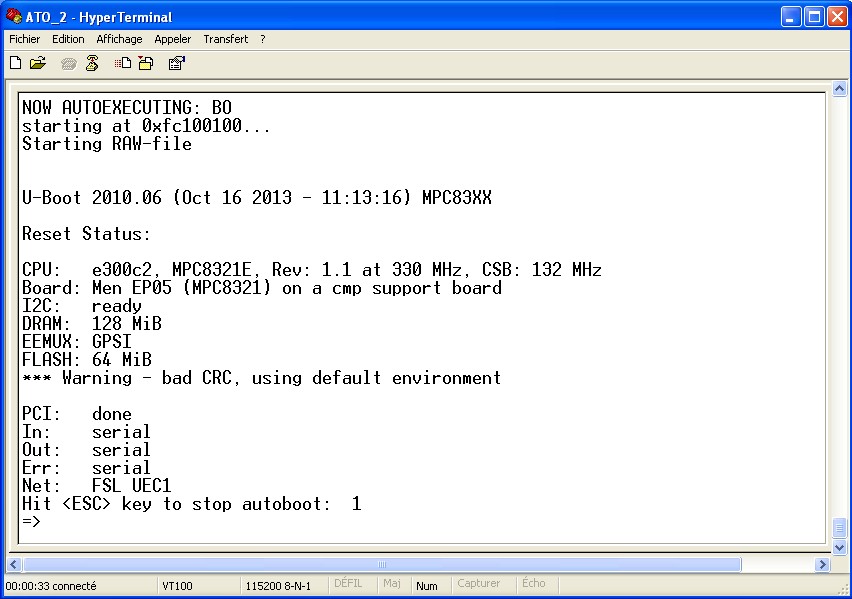
在系统启动过程中,当看到显示
Hit any key to stop autoboot
并在倒计时为零前按键盘任意键,就可进入下载模式;或烧录了U-boot,但还没有烧入操作系统内核时,不按键盘也将进入该模式。
U-Boot下载模式的常用命令
U-Boot提供了强大的命令行界面,可通过终端模拟器连接到板子来进行操作 。进入下载模式后,可键入help获取可用的命令,各版本可能会略有差异。
>help
?       - alias for 'help'
askenv  - get environment variables from stdin
autoscr - run script from memory
base    - print or set address offset
bdinfo  - print Board Info structure
boot    - boot default, i.e., run 'bootcmd'
bootd   - boot default, i.e., run 'bootcmd'
bootm   - boot application image from memory
bootp   - boot image via network using BootP/TFTP protocol
chpart  - change active partition
cmp     - memory compare
coninfo - print console devices and information
cp      - memory copy
crc32   - checksum calculation
dhcp    - invoke DHCP client to obtain IP/boot params
echo    - echo args to console
erase   - erase FLASH memory
exit    - exit script
ext2load- load binary file from a Ext2 filesystem
ext2ls  - list files in a directory (default /)
fatinfo - print information about filesystem
fatload - load binary file from a dos filesystem
fatls   - list files in a directory (default /)
flinfo  - print FLASH memory information
fsinfo  - print information about filesystems
fsload  - load binary file from a filesystem image
go      - start application at address 'addr'
help    - print online help
iminfo  - print header information for application image
imls    - list all images found in flash
itest   - return true/false on integer compare
loadb   - load binary file over serial line (kermit mode)
loads   - load S-Record file over serial line
loady   - load binary file over serial line (ymodem mode)
loop    - infinite loop on address range
ls      - list files in a directory (default /)
md      - memory display
mii     - MII utility commands
mm      - memory modify (auto-incrementing)
mtdparts- define flash/nand partitions
mtest   - simple RAM test
mw      - memory write (fill)
nand    - NAND sub-system
nboot   - boot from NAND device
nfs     - boot image via network using NFS protocol
nm      - memory modify (constant address)
ping    - send ICMP ECHO_REQUEST to network host
pmb     - displays the contents of the PMB
printenv- print environment variables
protect - enable or disable FLASH write protection
rarpboot- boot image via network using RARP/TFTP protocol
reset   - Perform RESET of the CPU
run     - run commands in an environment variable
saveenv - save environment variables to persistent storage
setenv  - set environment variables
sleep   - delay execution for some time
test    - minimal test like /bin/sh
tftpboot- boot image via network using TFTP protocol
usb     - USB sub-system
usbboot - boot from USB device
version - print monitor version
一般情况下对于使用Linux的STR板卡才需要烧录U-Boot,例如1.9.1基线中的DLU、USW和1.9.2基线中的多数板卡。我们烧录板卡软件常用的U-Boot指令有
autoscr从内存中运行指定脚本程序erase擦除闪存内容ping判断网络的连通性protect启用或关闭闪存的写保护setenv设置环境变量tftpboot通过网络使用TFTP协议来启动系统镜像